

A website lead can be real and still go quiet. Sometimes the customer found another provider. Sometimes the response took too long. Sometimes the form created a record but not a clear next task.
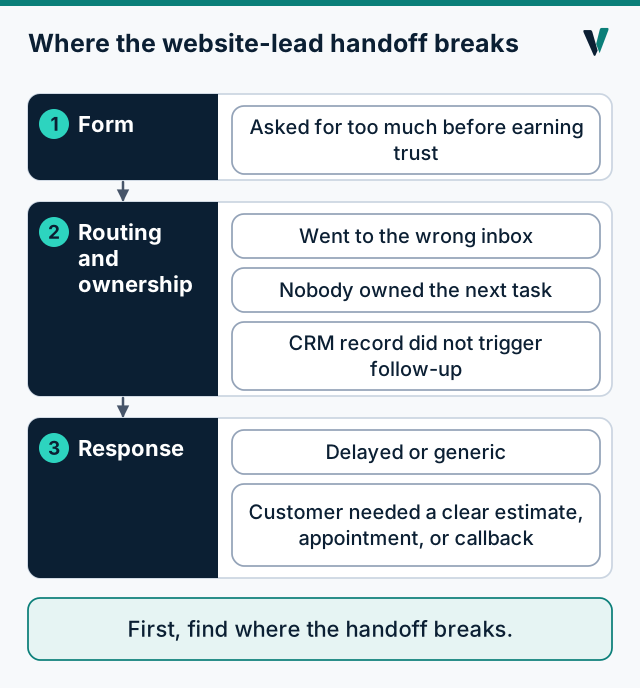
The answer is not always more automation. The first step is understanding where the handoff breaks.
Common reasons leads go quiet
- The form asked for too much before earning trust.
- The response was delayed or generic.
- The lead went to the wrong inbox.
- Nobody owned the next task.
- The customer needed a clear estimate, appointment, or callback.
- The CRM record existed but did not trigger follow-up.
A short audit you can run this week
Walk through your own form as if you were the customer, then follow what happens to the request. Five checks cover most of it.
- Field friction. Count the required fields. Ask for only what you need to reply, and let the rest wait. For example, Vayna's own Lead Leak Check requires five things: a name, a business name, the email you use for your business, the main problem, and a tick to say we may reply. Everything else, including a phone number and a website, is optional.
- Routing. Submit a test request. Where does it actually land, and who sees it? A form that sends to a shared inbox is a form nobody owns.
- Ownership. Is one person named for the next step? "The office" is not a person.
- Acknowledgment. Does the visitor see something that says the request arrived, what happens next, and how to reach you if it did not? If you do not send a confirmation email, say so on the page, so the page is the receipt.
- Next step and due date. Does the request create a task with a date, or only a record? A record that triggers nothing is the most common quiet failure.
| Check | A good answer | A warning sign |
|---|---|---|
| Field friction | Only what is needed to reply is required | A long form before any trust is earned |
| Routing | A named person receives it | A shared inbox |
| Ownership | One owner for the next step | "Whoever sees it first" |
| Acknowledgment | Confirmation on the page, with what happens next | The form just clears |
| Next step | A task with a due date | A record with no task |
A failure, and a safe recovery
This is an illustration. A homeowner fills in a form late at night and their connection drops as they press send. A form that clears itself shows an empty page, so they assume it worked, and the business never hears from them.
A safer form keeps what they typed, says plainly that it did not go through, and lets them try again without creating two requests. When it does go through, it shows a reference they can quote. If the form cannot reach you at all, it tells them to email you instead, so a failed form is never the end of the conversation.
Next step
Run the audit on your own form first. If you want a second set of eyes on where follow-up and routing may be slipping, the free Lead Leak Check is a written review of exactly that.