

Estimate follow-up is one of the clearest revenue recovery workflows. The customer has already shown interest, the business has already done work, and the next step is often simple. The risk is letting the quote disappear without an owner.
The process below is designed for reviewable work, not automatic communication.
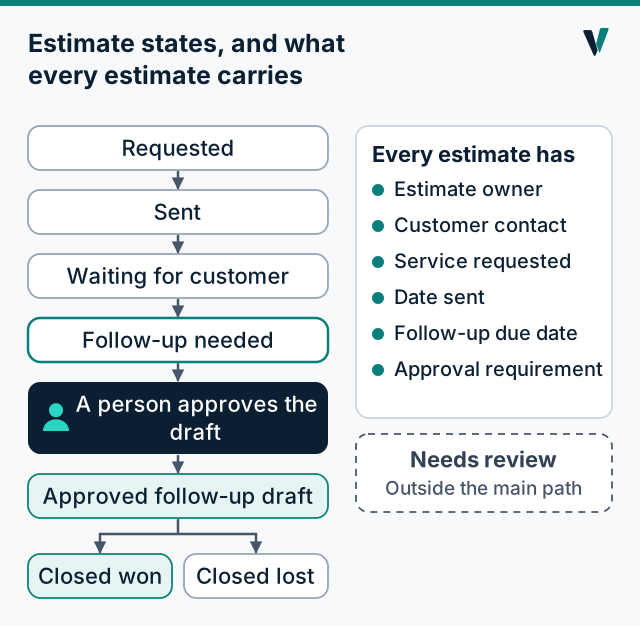
Define the estimate states, and what each one asks of you
A list of states only helps if each one says who acts and what happens next. Use a review table like this one and fill it in for every open estimate.
| State | What it means | Who acts | Next action |
|---|---|---|---|
| Requested | The customer asked for a quote | Estimator | Visit or quote; set a date to send |
| Sent | The estimate went out | Owner of the estimate | Set the follow-up date now, before anything else |
| Waiting for customer | The follow-up date has not arrived | Nobody yet | Leave it alone until the date |
| Follow-up needed | The date has arrived | Owner of the estimate | Prepare a short follow-up draft for review |
| Approved follow-up draft | A person approved the wording | Owner of the estimate | Send it and log that you did |
| Needs review | Something does not fit: a changed scope, a complaint, a question about price | The business owner | Decide by hand |
| Closed won / lost | The customer decided | Owner of the estimate | Record the outcome and the reason |
Assign ownership before drafting messages
Every estimate should have a human owner. Someone may prepare a task or a draft, but the business should know who is responsible for the relationship.
- Estimate owner.
- Customer contact.
- Service requested.
- Date sent.
- Follow-up due date.
- Approval requirement.
Create a review queue
A useful queue shows the work waiting for review without sending anything automatically.
- Opportunity Found.
- Follow-Up Draft.
- Approval Required.
- Activity Logged.
- CRM Updated after approval.
Keep the message draft modest
Follow-up should be specific, short, and reviewed. The draft should never invent discounts, urgency, guarantees, or promises.
- Mention the estimate.
- Ask whether the customer has questions.
- Offer a clear next step.
- Keep owner judgment in control.
A sample draft, for illustration. Adjust the wording to sound like you, and have the estimate's owner approve it before it is sent:
Hi Maria, this is Dana at Example Roofing. I wanted to check whether you had any questions about the re-roof estimate I sent on October 3. I am happy to walk through it by phone, and no problem at all if the timing has changed. Either way, let me know and I will update my notes.
When to hold, drop or leave an estimate alone
Not every open estimate should get a follow-up. Before drafting anything, check the exceptions:
- Held. The customer said "not until spring" or asked you to wait. Set a date after that, and do not contact them before it.
- Lost. The customer chose someone else or told you no. Close it and record why. One polite, optional note is fine; a sequence is not.
- Suppressed. The customer asked not to be contacted, or the number or address is wrong or bounced. Do not contact them again by that route, and keep that on record so a later list does not bring them back.
- No usable route. You have an email address but no phone, or the reverse. Use the route you have and never guess at the other.
Next step
Start with one honest count: how many estimates went out in the last 60 days, and how many have a dated follow-up on record? If you want a written second opinion, the Free Lead Leak Check includes how estimates are created, tracked and followed up today, and sends nothing to your customers.